Most people pack the same travel apps for every trip: maps for getting around, reviews for restaurants, and maybe a booking tool for tickets. Those tools are excellent at logistics. They are weaker at answering the question that makes a place memorable - what happened here, and why does this street look the way it does?
That gap has created a growing category of history travel apps. Some are polished audio tours. Some are landmark databases. Others sit closer to general travel apps and only sprinkle in heritage highlights. Choosing well matters, because the wrong app steers you toward the same five attractions every other visitor photographs, while the right one turns an ordinary afternoon into a story you can follow on foot.
This guide compares how popular travel apps and dedicated history travel apps actually behave when you are already in a city, phone in hand, trying to make sense of the past without booking a private guide.
What a history travel app should do
Before naming products, it helps to separate jobs. A good history travel app should do at least one of these well:
- Orient you in time - show which layers of the past survive where you are standing
- Guide a route - take you through a coherent sequence of stops with narrative
- Support spontaneous discovery - answer "what is that building?" without a pre-booked tour
- Work beyond the tourist core - remain useful in residential streets, harbours, and smaller towns
General travel apps usually win at transport and ratings. Dedicated history tools win when the story itself is the reason you walked that way.
Google Maps and Apple Maps - brilliant logistics, thin history
Maps apps are still the backbone of travel. They find stations, estimate walking times, and keep you from getting lost between museum and hotel. Historical layers exist in places - labels for castles, blue plaques in some cities, Wikipedia-style snippets - but they are secondary to navigation.
Strengths: Universal coverage, offline downloads, transit integration, and reliable walking directions between stops you already chose.
Limitations: History appears as points of interest, not as connected narrative. You get names and star ratings more often than cause-and-effect. Ordinary streets with rich pasts remain blank.
Best for: Moving efficiently between sites you selected elsewhere. Treat maps as the skeleton of a history day, not the historian.
Tripadvisor and similar review platforms - popularity, not depth
Review apps help you decide whether a castle tour or a crypt visit is worth the queue. User photos and recent comments are useful for practical planning: accessibility, ticket tips, whether the audio guide is any good.
Strengths: Honest crowd feedback and opening-hour reality checks. Strong for famous monuments where visitor volume is high.
Limitations: Ranking systems reward fame and marketing. A quiet medieval lane with no ticket booth rarely climbs the list. Reviews describe the visit experience more than the historical significance.
Best for: Deciding whether to pay for a major attraction, not for discovering the neighbourhood around it.
Rick Steves Audio Europe - classic free walking tours
Among dedicated history travel apps, Rick Steves remains a favourite for first-time visitors to major European cities. Downloadable audio walks cover headline routes with clear pacing and offline listening.
Strengths: Free, trustworthy for classic itineraries, and designed for walking rather than driving past plaques.
Limitations: You follow a prepared script through famous sights. It will not explain the unlabelled warehouse two streets off the route, and it is not built for your home city or a small harbour town.
Best for: Budget travellers doing London, Edinburgh, Rome, or similar capitals who want one polished spine through the old centre.
VoiceMap and GPS audio tour libraries
VoiceMap and similar GPS audio products unlock automatically as you walk. Many cities have rich catalogues of themed history walks narrated by local writers and guides.
Strengths: High production values and strong neighbourhood storytelling. Excellent when you want a themed two-hour walk with a beginning, middle, and end.
Limitations: The best tours are often paid. Coverage clusters in popular destinations. Freemium catalogues can feel thin once you leave the tourist core.
Best for: Travellers who enjoy a produced narrative for one specific district and do not mind buying a tour when free options run out.
Clio, History Near You, and marker-style heritage apps
Marker and alert apps are strong in parts of North America and growing elsewhere. They notify you near historical entries or let you browse community-authored landmarks and walking trails.
Strengths: Genuine free access in many cases, and a documentary tone when museums and historical societies contribute content. Good for road trips where you pass more history than you planned to stop for.
Limitations: Geographic coverage is uneven. Depth varies by contributor. Some tools feel closer to a landmark index than a travel companion for a city break abroad.
Best for: US-centred travel and travellers who want free, place-based entries rather than cinematic audio.
AI photo-to-story and "ask the street" tools
A newer wave of history travel apps lets you point a camera at a facade or open the app for an auto-narration of the area. They feel magical at famous landmarks.
Strengths: Low planning friction. Useful when something catches your eye and you want context immediately.
Limitations: Coverage and accuracy thin out on ordinary streets. Daily free caps are common. Narration can sound confident even when the underlying sources are shallow, so treat them as prompts rather than final authorities.
Best for: Short exploratory walks and landmark-heavy centres where visual recognition works best.
LocoPast - map-first history for travellers who wander
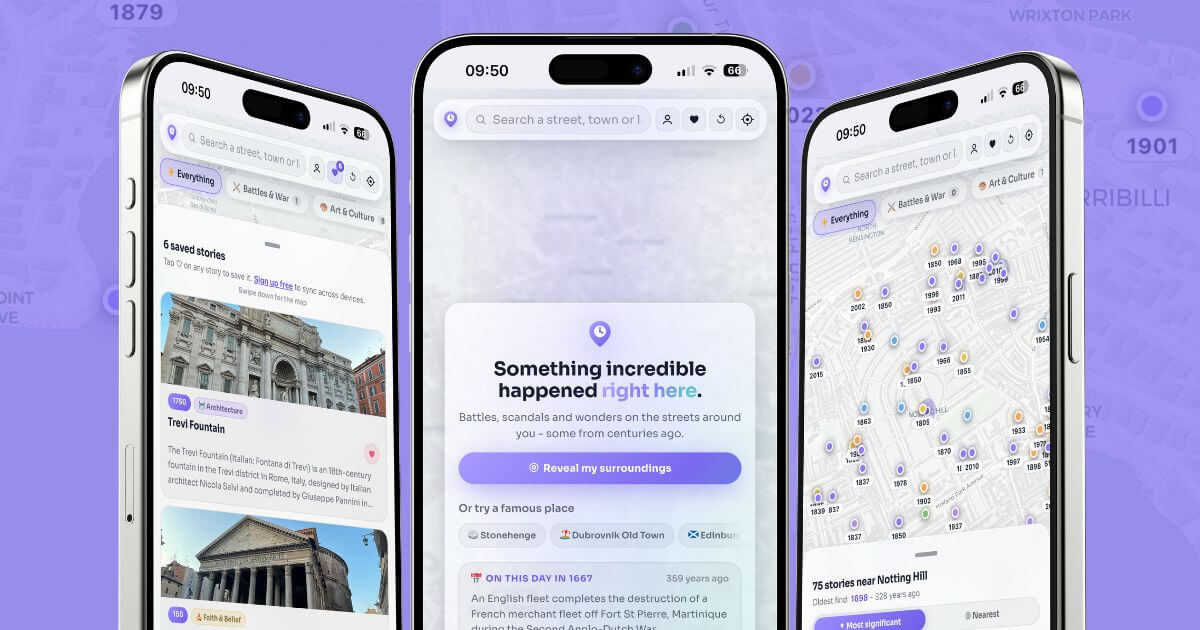
Clearly, we're going to put ourselves into the mix here but we'll try and do it as authentically as possible - we promise. Most travel apps start with bookings or routes. Most history travel apps start with a tour catalogue. LocoPast starts with the map where you stand. Open it and nearby historical stories appear as pins you can browse, filter, and walk toward. That model suits people who dislike committing to a fixed audio path before they understand the shape of a place.
On a city break, that difference is practical. You can finish a museum visit, step outside, and see what sits two streets away instead of returning to the same guidebook shortlist. You can also use it at home, which trains the habit before you travel. Midway through a trip, when curiosity outruns your itinerary, a map of nearby stories is more useful than another five-star attraction you already planned to skip.
Try it in the browser or app via LocoPast, or practise on a dense historic core such as Edinburgh Old Town to see how pins fan outward from a well-known anchor.
Best for: Travellers who want location-first discovery - build your own history walk from nearby events and places, on holiday or on a familiar high street.
Quick comparison for travellers
| Tool type | Example | Strongest job | Weakest job |
|---|---|---|---|
| General maps | Google / Apple Maps | Getting between stops | Narrative history |
| Review platforms | Tripadvisor | Rating major attractions | Quiet local history |
| Curated audio | Rick Steves | Classic first-visit routes | Spontaneous side streets |
| GPS tour libraries | VoiceMap | Produced neighbourhood walks | Unlimited free coverage |
| Marker / alert apps | Clio, History Near You | Free landmark discovery | Even global travel coverage |
| Photo / AI narration | Landmark camera tools | Instant building context | Ordinary street depth |
| Map-first history | LocoPast | Nearby stories you choose | Replacing a booked museum ticket |
How to choose for your next trip
If you are visiting a major European city for the first time and want one guided afternoon, start with a curated audio walk. If you are road-tripping through US heritage sites, marker and alert apps earn their place. If you mainly need trains, walking times, and restaurant queues, keep your usual travel apps.
If your goal is history travel in the fuller sense - understanding a place through its layers, including the streets that never make the top-ten lists - prioritise tools that respond to location rather than only to popularity. Pair a maps app for navigation with a history travel app for meaning. Use reviews to decide on paid monuments. Use a map-first tool when you want the freedom to follow density instead of a script.
A simple kit that works in practice
A practical setup for most travellers looks like this:
- Maps app for routes, transit, and offline navigation
- One curated tour (free or paid) for a famous historic core on day one
- LocoPast for the rest of the trip, when you want nearby stories without booking another walk
- Official heritage sites for ticketed interiors and conservation notes
That combination covers logistics, a strong first narrative, and ongoing discovery. It also avoids the trap of staring at a screen for an entire afternoon. Read a story, look up at the building, then walk to the next pin.
Travel apps get you there. History travel apps decide whether the place feels like a checklist or a conversation with the past. Choose the ones that leave room for the street itself.